Dispatch, threads, subagents
Friday has three kinds of agent. You almost always interact with one: Dispatch. The others run in the background.
This page describes Dispatch mode, the default. If you'd rather skip the Dispatch indirection and chat with a single agent that edits files directly, see Classic mode.
| Dispatch | Thread | Subagent | |
|---|---|---|---|
| How many | One per session | As many as you want | One per Agent tool call |
| Created | When Friday starts | You ask, or you click + New Thread | The agent calls the Agent tool |
| UI pane | Yes, the main one | Yes, one per thread | No |
| Can edit files | No | Yes | Depends on the agent definition |
Dispatch
The thread you type into. It's there from the moment Friday starts. Its job is conversation and coordination: read code, plan, decide what to delegate. Dispatch can't write or edit files; that's a thread's job.
You can't have more than one Dispatch. You can't close it. You can't have zero. It's the entry point.
Threads
Threads do the editing. They run in parallel, isolated from each other and from Dispatch. In GIT mode, every thread runs in its own git worktree on its own branch. When a thread finishes, the merge queue cherry-picks its branch onto yours.
Threads spawn three ways:
- Dispatch creates one when delegating a task. This is the common path. You ask Dispatch to build something; it spins up a thread to do the work.
- You click + New Thread in the bottom-left of the ThreadList.
- You type
/fork <description>to start a thread that carries the current conversation forward.
Every thread, whether you spawned it or Dispatch did, appears in the ThreadList on the left. Click any row to switch into that thread's pane and see what it's doing.
You can have as many threads running as you have parallel work to do.
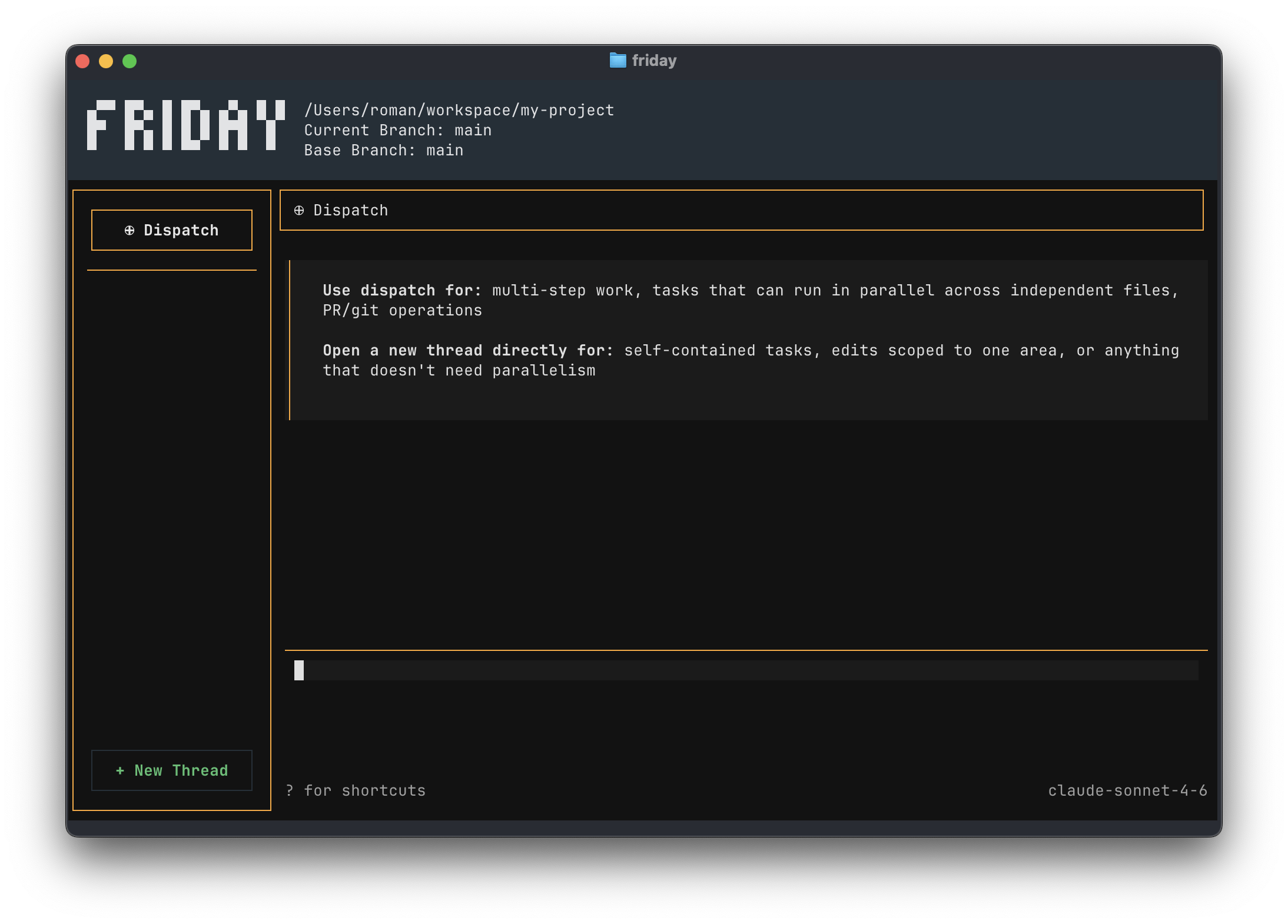
When to use Dispatch vs a new thread
This is the question Friday's empty state answers on first launch:
Use dispatch for: multi-step work, tasks that can run in parallel across independent files, PR/git operations.
Open a new thread directly for: self-contained tasks, edits scoped to one area, or anything that doesn't need parallelism.
In practice:
- "Add user auth, write tests, and update the docs": tell Dispatch. It will likely spawn one or more threads.
- "Rename
useFootouseBaracross the codebase": click + New Thread. One scoped edit, no coordination needed. - "Refactor the auth module while you also update the API endpoints": tell Dispatch. It will fan out into two threads.
The asymmetry is the point. Dispatch is the one place that knows about everything in the session. Threads are the workers it sends out.
Accepting a thread's changes
A thread's commits stay on its own branch until the thread calls AcceptThread. That call is the merge gate. After it runs and is approved, the merge queue cherry-picks the commits onto your current branch.
There are two gates in play: whether the thread calls AcceptThread on its own, and whether the user-confirmation modal shows when it does.
Whether the thread calls AcceptThread on its own. For threads Dispatch spawned, the runner injects "Call AcceptThread" automatically when the thread reports task complete and its message queue is empty. But whether a thread reaches task complete depends on Working Style: Collaborative workers are told to ask clarifying questions and explain their approach first, so on a non-trivial task they often pause for input rather than completing autonomously. Supervised and Autonomous workers are told to keep going until done. End result: dispatched workers complete and self-accept reliably in Supervised and Autonomous; in Collaborative, only on tasks simple enough that there's nothing to ask.
Whether you see a "Ready to accept this thread?" prompt when AcceptThread runs:
- Collaborative (default): the prompt shows the first time you accept a thread. After you say yes once, subsequent accepts on that same thread skip the prompt.
- Supervised and Autonomous: no prompt. The cherry-pick happens silently.
- Threads tied to a
probetask: no prompt regardless of Working Style.
If a parallel dispatch leaves you with one "Ready to accept this thread?" prompt per thread, you're in Collaborative mode. Switch to Supervised or Autonomous in /settings to merge dispatched threads end-to-end without prompting.
After cherry-pick succeeds, Dispatch receives a <worker_message> summarizing what the thread did and confirming the merge. The thread's branch and worktree are deleted; the commits live on your current branch.
Subagents
A subagent is one-shot. It has no UI pane, no message queue, no separate ThreadList entry. The Agent tool spawns it, the subagent runs to completion, and its final text becomes the tool's result. You'll see them in the Dispatch transcript as a nested entry labeled with the agent's name and a short description of the run, with streaming output.
Friday ships three built-in subagents:
file-search: locate code in the project. Tools: read, grep, glob.web-search: search the web for current information. Tools: WebSearch.friday-handbook: answer questions about Friday itself.
You can write your own. See Subagents.
How they talk
        You
         │
         ▼
    Dispatch ─── Agent ────────────▶ Subagent (returns text)
       │
       ├── CreateWorkerThreadForTask ─▶ Thread
       ├── SendMessageToWorkerThread ─▶ Thread
       ├── AbandonWorkerThread        ─▶ Thread
       │
       ◀── SendMessageToDispatch ──── Thread
                                      Thread → AcceptThread → merge queue
Dispatch owns coordination. Threads own implementation. Subagents own short, scoped investigations. Stick to those roles when you write your own subagent definitions.
Read next
- Threads: worker thread lifecycle and the merge queue.
- Subagents: write your own.
- How Friday works: the loop they all run.